
Download COUNT – AI‑Powered Accounting Automation Tool for Small Business
Overview
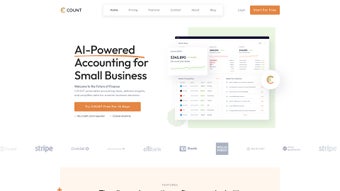
COUNT is an AI‑driven accounting automation platform built specifically for small‑business owners who want to replace manual data entry with intelligent, error‑reducing workflows. By leveraging machine‑learning algorithms, COUNT automatically categorizes transactions, flags discrepancies, and suggests corrective actions before they become costly mistakes. The dashboard presents real‑time cash‑flow snapshots, expense trends, and profit‑margin alerts, empowering entrepreneurs to make informed financial decisions without a dedicated accounting department.
Integrated invoicing tools accelerate payment cycles: invoices are auto‑generated, emailed, and tracked, while reminders are sent automatically when due dates approach. Collaboration features let team members assign tasks, comment on entries, and approve expenses within a secure, role‑based environment. Though COUNT shines in streamlining everyday bookkeeping, it is deliberately scoped for the needs of small firms, meaning it does not yet support multi‑currency handling or native mobile apps.
Nevertheless, its partnership network includes major banks, payment processors, and tax filing services, ensuring that data flows seamlessly between COUNT and the broader financial ecosystem. In short, COUNT offers a secure, cloud‑based solution that reduces manual effort, improves accuracy, and delivers actionable insights—all while keeping the price point affordable for startups and growing businesses. Additionally, the platform adheres to strict compliance standards such as GDPR and SOC 2, giving peace of mind to users who handle sensitive financial information.
By continuously learning from each transaction, the AI engine becomes more precise over time, turning COUNT into a self‑optimizing assistant rather than a static tool.
Key Features & Benefits
- AI Auto‑Categorization: Machine‑learning models analyze transaction descriptions and automatically assign them to the correct expense or revenue accounts, cutting manual entry time by up to 80%.
- Intelligent Discrepancy Alerts: Real‑time monitoring detects mismatched amounts, duplicate entries, or out‑of‑pattern spending, prompting users to resolve issues before they affect reports.
- Auto‑Tagging & Rule‑Based Assignments: Users can create custom tagging rules (e.g., “all Uber rides → Travel”) that the system applies instantly to new data.
- Simplified Invoicing: Generate professional invoices from templates, schedule automatic email delivery, and track payment status without leaving the platform.
- Personalized Dashboard: Drag‑and‑drop widgets display cash‑flow forecasts, overdue invoices, expense breakdowns, and key performance indicators tailored to each user role.
- Team Collaboration Tools: Assign tasks, add comments, and set approval workflows so accountants, managers, and owners stay aligned.
- Secure Cloud Storage & Backup: End‑to‑end encryption protects financial data, while automated nightly backups guarantee recovery in case of accidental loss.
- Extensive Integration Network: Connects directly with over 150 banking institutions, payment gateways (Stripe, PayPal), and tax filing services, reducing the need for manual CSV imports.
- Scalable Pricing Model: Free tier for up to 100 transactions per month, with affordable paid plans that unlock unlimited entries, priority support, and advanced reporting.
- Custom Reporting Engine: Build tailored financial statements, profit‑and‑loss reports, and balance sheets using a drag‑and‑drop report builder that can be exported as PDF or Excel files.
The combination of these features translates into tangible business benefits: faster month‑end closes, reduced accounting errors, improved cash‑flow visibility, and more time for owners to focus on growth initiatives. Because the AI engine learns from each user’s historical data, accuracy improves over time, making COUNT a continuously evolving asset rather than a static tool. Moreover, the platform’s role‑based access controls ensure that sensitive financial information is only visible to authorized personnel, helping companies meet internal audit requirements. The intuitive UI reduces onboarding time; most new users become proficient within a single afternoon, and the built‑in knowledge base offers step‑by‑step tutorials for advanced scenarios such as tax‑rate configuration and multi‑entity consolidation. Overall, COUNT delivers a holistic accounting experience that balances automation with the flexibility needed by diverse small‑business environments.
Installation, First‑Time Setup & Compatibility
Getting started with COUNT is designed to be frictionless. The web‑based application runs on any modern browser, and a lightweight desktop client is available for Windows 10/11 and macOS 12+. To install, follow these steps:
- Visit the official website: Click the “Download COUNT” button, which redirects to the secure download portal.
- Select your platform: Choose the Windows installer (.exe) or macOS package (.dmg). For users who prefer a browser‑only experience, simply click “Use Online” to launch the cloud app.
- Run the installer: Follow the on‑screen wizard—accept the license agreement, choose an installation folder, and let the installer copy files and configure the local service.
- Create your account: After installation, launch COUNT and sign up with an email address. A verification link is sent to confirm ownership.
- Connect your financial sources: In the “Integrations” tab, add bank accounts, credit cards, or payment processors using secure OAuth authentication. COUNT will begin importing transactions automatically.
- Configure auto‑tagging rules: Navigate to Settings → Automation. Define keyword‑based rules (e.g., “Amazon” → “Office Supplies”) and set thresholds for discrepancy alerts.
- Invite team members: Under “Team,” add users by email, assign roles (Owner, Accountant, Viewer), and configure approval workflows.
- Run the onboarding wizard: COUNT walks you through creating your first invoice, generating a profit‑and‑loss report, and customizing the dashboard layout.
- Enable two‑factor authentication (2FA): For added security, activate 2FA via the Security Settings page. You can use an authenticator app or SMS codes.
- Explore advanced features: After the core setup, experiment with custom reporting, scheduled backups, and API access for developers who want to integrate COUNT with proprietary systems.
COUNT officially supports Windows 10/11, macOS 12+ (Catalina and later), and any device with a modern browser (Chrome, Edge, Firefox, Safari). While a native mobile app is not yet available, the responsive web interface works on Android and iOS tablets, allowing users to review reports on the go. Minimum system requirements include 4 GB RAM, 500 MB of disk space for the desktop client, and an active internet connection for cloud synchronization.
After the initial setup, most users spend less than five minutes each day reviewing alerts, approving expenses, or sending invoices—an impressive reduction compared with traditional spreadsheet‑based bookkeeping. The onboarding wizard also includes a short video series that explains each major feature, helping teams adopt best practices quickly. For organizations with strict IT policies, COUNT offers a self‑hosted option that can be deployed behind a corporate firewall, though this requires an enterprise license. Overall, the installation experience is engineered to minimize friction while maximizing security and scalability.
Pros, Cons, and Frequently Asked Questions
Pros
- Highly accurate AI auto‑categorization reduces manual entry.
- Real‑time discrepancy alerts prevent costly errors.
- User‑friendly dashboard provides instant financial insights.
- Robust integration ecosystem eliminates CSV imports.
- Scalable pricing model fits startups to mid‑size firms.
- Custom reporting engine allows tailored financial statements.
- End‑to‑end encryption and SOC 2 compliance ensure data security.
- Responsive web app works on tablets, giving flexibility without a native mobile app.
Cons
- No native mobile applications for iOS or Android.
- Lacks multi‑currency support, limiting use for export‑oriented businesses.
- Advanced tax‑planning features are only available in higher‑tier plans.
- Desktop client is optional; some users prefer a full‑featured mobile app.
- Self‑hosted deployment requires an enterprise license and additional IT overhead.
Frequently Asked Questions
Is COUNT suitable for businesses with more than 50 employees?
Yes. While COUNT is optimized for small‑business workflows, its role‑based permissions and team collaboration tools scale to accommodate larger teams. Organizations with up to 200 users can manage access levels and approval chains without performance degradation. For enterprises beyond that size, COUNT offers an enterprise‑grade licensing model with dedicated support and optional on‑premises deployment.
Can I export my data to QuickBooks or Xero?
COUNT offers direct export options for both QuickBooks Online and Xero. Users can generate a .csv or .qbo file from the “Export” menu, then import it into the target platform. Future updates will include a one‑click sync for seamless data transfer, reducing the need for manual file handling.
How secure is my financial data stored in COUNT?
COUNT uses AES‑256 encryption for data at rest and TLS 1.3 for data in transit. All integrations rely on OAuth 2.0, and regular third‑party security audits verify compliance with GDPR and SOC 2 standards. Additionally, administrators can enforce two‑factor authentication and IP‑allowlist restrictions for enhanced protection.
Is there a free trial or free tier available?
COUNT offers a free tier that supports up to 100 transactions per month, ideal for freelancers or very small businesses. A 14‑day free trial of the premium plan is also available, unlocking unlimited transactions, advanced reporting, and priority support. No credit card is required to start the trial.
How does COUNT handle tax calculations?
The software automatically applies tax rates based on the jurisdiction settings you configure. For U.S. users, sales tax, VAT, and GST can be set per state or country. Tax reports are generated quarterly and can be exported directly to major tax filing services, simplifying compliance for small businesses.
Can I integrate COUNT with my existing ERP system?
Yes. COUNT provides a RESTful API and webhook support that allows bi‑directional data exchange with most ERP platforms. Documentation and sample code are available in the developer portal, enabling custom integrations for inventory, payroll, or CRM systems.
Conclusion & Call to Action
COUNT delivers a compelling mix of AI automation, intuitive design, and robust integrations that address the most time‑consuming aspects of small‑business accounting. By eliminating manual data entry, providing instant discrepancy alerts, and simplifying invoicing, it frees owners and accountants to focus on strategic growth rather than repetitive bookkeeping. Although the absence of mobile apps and multi‑currency support may be limiting for some, the platform’s secure cloud architecture, affordable pricing, and roadmap for future enhancements make it a smart investment for any business looking to modernize its financial operations. Ready to experience hassle‑free accounting? Download COUNT today and start your free trial—your books will thank you.



.png)



